Download Dailymotion videos as MP4
Dailymotion is one of the oldest video platforms on the internet, with news, TV clips, sports, music, documentaries and creators from all over the world. With DescargarVideo you can download Dailymotion videos as MP4 and watch them whenever you like, even without a connection.
All you need is the video link. No account, no software and no browser extension.
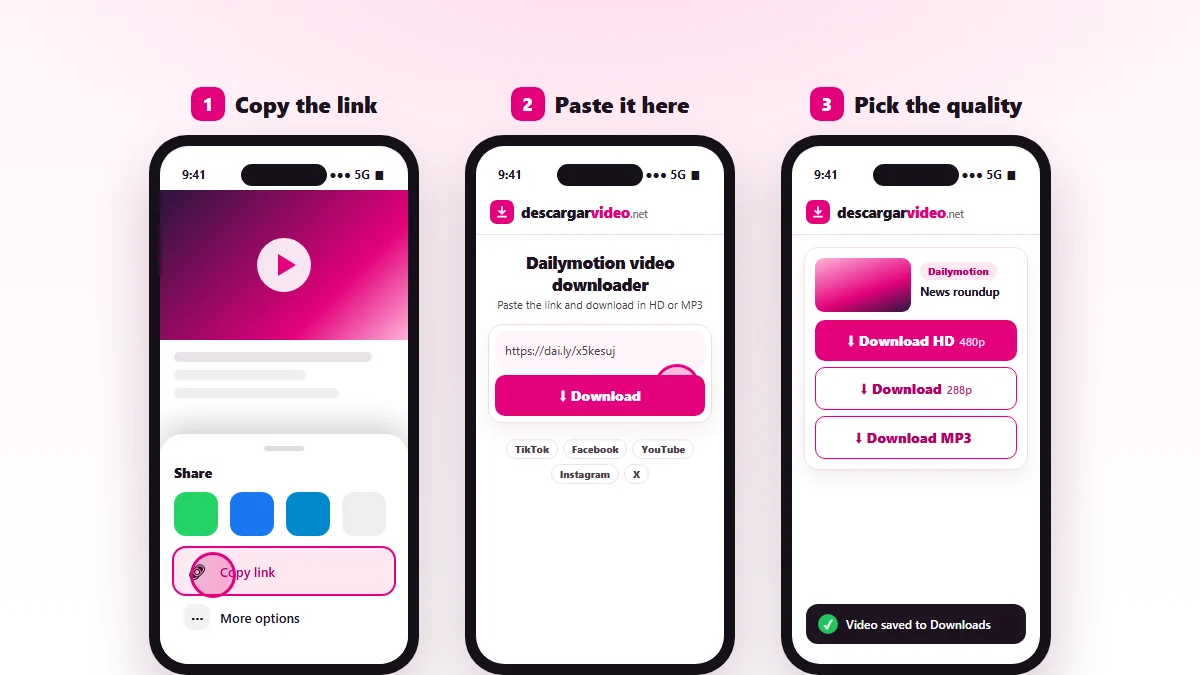
How to download Dailymotion videos on your phone
- Open the video in the app or the browser.
- Tap Share → Copy link.
- Go to en.descargarvideo.net/dailymotion-video-downloader/, paste the link and tap Download.
- Choose Download HD. On Android the video lands in your gallery; on iPhone, in Files → Downloads.
How to download Dailymotion videos on a computer
Open the video on dailymotion.com, copy the address from the browser bar and paste it into the downloader. Click the quality you want and the MP4 is saved to your Downloads folder.
Available qualities
| Option | Format | Best for |
|---|---|---|
| Download HD | MP4, best quality | Watching on a big screen |
| Download | Light MP4 | Saving space, sending in a chat |
| Download MP3 | Audio only | Music, interviews, news |
Maximum quality depends on the original: many older Dailymotion videos are 480p or lower.
If a Dailymotion video will not download
- The video is private, age-restricted or paid.
- The video was removed or is not available in your country.
- The link is for a playlist. Open the video and copy that link.
Looking for videos from other platforms? The main video downloader handles TikTok, Facebook, YouTube and more from the same box.
Responsible use
Dailymotion videos belong to their authors and channels. Download them for your own viewing and do not re-upload them without permission. If you are a rights holder, see our DMCA policy.
Last updated: November 13, 2026