Twitter (X) Video Downloader

Paste the link of a post on X (formerly Twitter) and save its video in the best quality, or just the audio as MP3. No login, no app.

Free · No sign-up · No app to install · Works on Android, iPhone and PC

Checking the video, one moment…
Step by step

How to download a video from X (Twitter)

  1. 1

    Copy the post link

    On the post with the video, tap the share icon and choose Copy link. Links from x.com and twitter.com both work.

  2. 2

    Paste it into the downloader

    Paste the link in the box above and tap Download. You will see a preview of the video.

  3. 3

    Save the video

    Tap Download HD for the best quality or Download MP3 if you only want the audio.

Features

A no-fuss Twitter video downloader

  • x.com and twitter.com links

    It does not matter whether the link uses the new domain or the old one: both work.

  • Best quality

    X stores several qualities of every video. You get the highest one plus a light version.

  • GIFs as video

    GIFs on X are really short videos: you download them as MP4 and they play on any phone.

  • MP3 audio

    Keep just the sound of a video, like an interview or a podcast clip.

  • No X account

    You do not need to log in to X or give us access to your account.

  • Phone and computer

    Works on Android, iPhone, Windows and Mac in any browser.

Download videos from X (formerly Twitter) in seconds

Breaking news, game highlights, interview clips, memes and viral videos often show up on X before anywhere else. But the app has no button to download videos. With DescargarVideo you can download Twitter and X videos by pasting the post link: no login, no app and no fee.

The Twitter video downloader accepts links from x.com and twitter.com, so the network’s name change is not a problem.
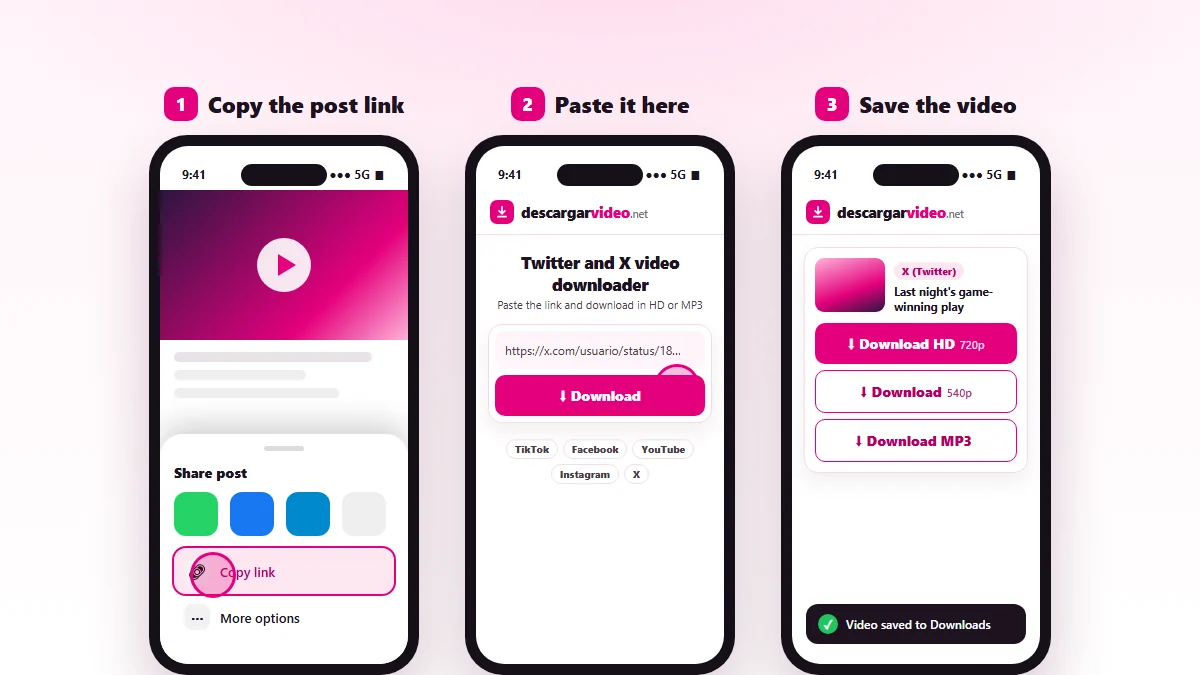
How to download Twitter and X videos: copy the post link, paste it into DescargarVideo and download in HD
Copy the X post link, paste it and download the video.

How to download X videos on your phone

  1. Open X and find the post with the video.
  2. Tap the share icon and choose Copy link.
  3. Open en.descargarvideo.net/twitter-video-downloader/ in your browser, paste the link and tap Download.
  4. Choose Download HD.

On Android the video lands in your gallery. On iPhone you will find it in Files → Downloads; use Share → Save Video to move it to Photos.

How to download Twitter videos on a computer

Open the post on x.com, copy the address from the browser bar and paste it into the downloader. Click Download HD and the video is saved as MP4 in your Downloads folder.

What you can download from X

Content Can you download it? Format
Videos from public posts Yes MP4 in HD or light
GIFs Yes Short MP4
Audio from a video Yes MP3
Protected accounts No —
Spaces (live audio) No —

Common uses for the Twitter downloader

  • Saving a news clip to watch later offline.
  • Sharing a viral video with friends and family in a group chat.
  • Backing up the videos you posted on X yourself.
  • Keeping a great play from a game or a moment from an interview.

If you only want the audio from a video, you can also use our MP3 converter.

If an X video will not download

  • The post is from a protected account or was deleted.
  • The video is inside a quoted post. Open the original post and copy that link.
  • X is limiting requests. Wait a minute and try again.

Responsible use

Videos posted on X belong to their authors. Download them for your own viewing, share with permission and credit whoever posted them. If you are a rights holder, see our DMCA policy.

Last updated: November 13, 2026

Common questions

Frequently asked questions

How do I download a video from Twitter?
Copy the link of the post with the video, paste it on this page and tap Download HD. The video is saved to your device as MP4.
Does it work with X?
Yes. Twitter is now called X and links use x.com, but old twitter.com links work too. You can download X videos exactly as before.
How do I copy the link of a video on X?
Tap the share icon under the post and choose Copy link. On a computer, open the post and copy the address from the browser.
Can I download Twitter GIFs?
Yes. GIFs on X are saved as short MP4 videos you can watch in your gallery or share in a chat.
Can I download videos from protected accounts?
No. Only public posts work. Protected or private accounts do not allow their content to be downloaded.
What if the post has several videos?
We download the main video of the post. If you need another one, open that video on its own and copy its link.
Where are the videos saved?
On Android, in Downloads and your gallery. On iPhone, in Files → Downloads, from where you can move them to Photos.