Download Facebook videos just by pasting the link
Facebook is still the social network with the biggest audience in the world, and every day it fills up with news clips, recipes, music, game highlights, church and small business streams, and family moments. Facebook has no download button, but with DescargarVideo you can save any public video in seconds: copy the link, paste it here and pick a quality.
No login, no app and no sign-up. This Facebook video downloader runs in the browser on your phone or computer.
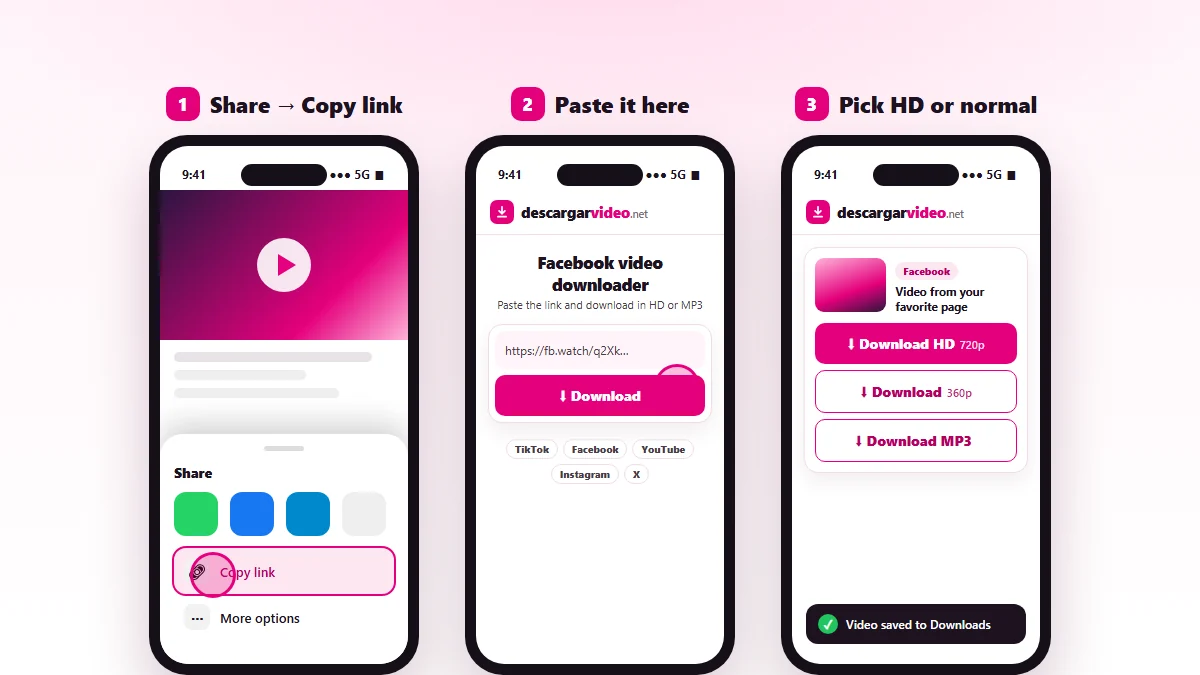
How to download Facebook videos on Android
- Open the Facebook app and find the video.
- Tap Share and choose Copy link.
- Open en.descargarvideo.net/facebook-video-downloader/ in Chrome.
- Tap Paste, then Download, and choose Download HD.
The video is saved to your Downloads folder and appears in your gallery. If you cannot see it, look in the Files app.
How to download Facebook videos on iPhone
- In the Facebook app tap Share → Copy link.
- Open this page in Safari and paste the link.
- Tap Download and confirm.
- Open Files → Downloads, tap the video and use Share → Save Video to see it in Photos.
Download Facebook videos on a computer
On Windows or Mac, open the video on facebook.com. If it is in your feed, click the post’s date or time to open it on its own page, then copy the address from the browser bar. Paste it into the downloader and click Download HD. The MP4 file lands in your Downloads folder.
How to copy a Facebook video link
| Where the video is | How to copy the link |
|---|---|
| Regular post | Share → Copy link |
| Reel | Share arrow → Copy link |
| Facebook Watch | Three dots → Copy link |
| Computer | Click the post’s date and copy the address |
Facebook videos in HD or normal quality
Facebook stores most videos in two qualities. Download HD gives you the sharpest picture, best for a big screen. Download gives you a lighter file that is easy to send in a chat and takes less space. If the original was uploaded in low quality, you will only see one option.
If a Facebook video will not download
- The video is from a private profile or a closed group, so it cannot be downloaded.
- The link points to a post with several photos and videos. Open the video by itself and copy that link.
- The broadcast is still live. Wait until it ends.
- Facebook is limiting requests. Wait a minute and try again.
Respect privacy and copyright
Facebook videos belong to whoever posted them. Download your own videos, your family’s, or content you have permission for, and never re-upload them as your own. If you are a rights holder, see our DMCA policy.
Last updated: November 13, 2026