Instagram Video Downloader

Paste the link of a Reel or a video post from a public account and save it in HD. No login and no app to install.

Free · No sign-up · No app to install · Works on Android, iPhone and PC

Checking the video, one moment…
Step by step

How to download an Instagram video

  1. 1

    Copy the Reel or video link

    On the Reel or post, tap the share icon (paper plane) and choose Copy link.

  2. 2

    Paste it into the downloader

    Paste the link in the box above and tap Download. You will see a preview of the video.

  3. 3

    Save the video in HD

    Tap Download HD and the video is saved to your device. You can also grab just the audio as MP3.

Features

An easy, private Instagram downloader

  • Reels in HD

    Download Instagram Reels in the best quality the network has available.

  • Video posts

    Save videos from regular posts on public accounts, not just Reels.

  • No login

    We never ask for your Instagram username or password. Be wary of any site that does.

  • Reel audio

    Love the sound on a Reel? Download it as MP3 with one tap.

  • No added marks

    The video downloads exactly as it was posted, with no logos added by us.

  • Works on any device

    Android, iPhone, Windows or Mac: all you need is a browser.

Download Instagram videos and Reels

Instagram is packed with comedy Reels, recipes, workouts, makeup tutorials and moments worth keeping. The app only lets you save them inside your collections, and if the creator deletes them, they are gone. With DescargarVideo you can download Instagram videos in HD and keep them in your gallery as a normal file.

This Instagram video downloader works with Reels and with video posts from public accounts. No login: we will never ask for your username or password.
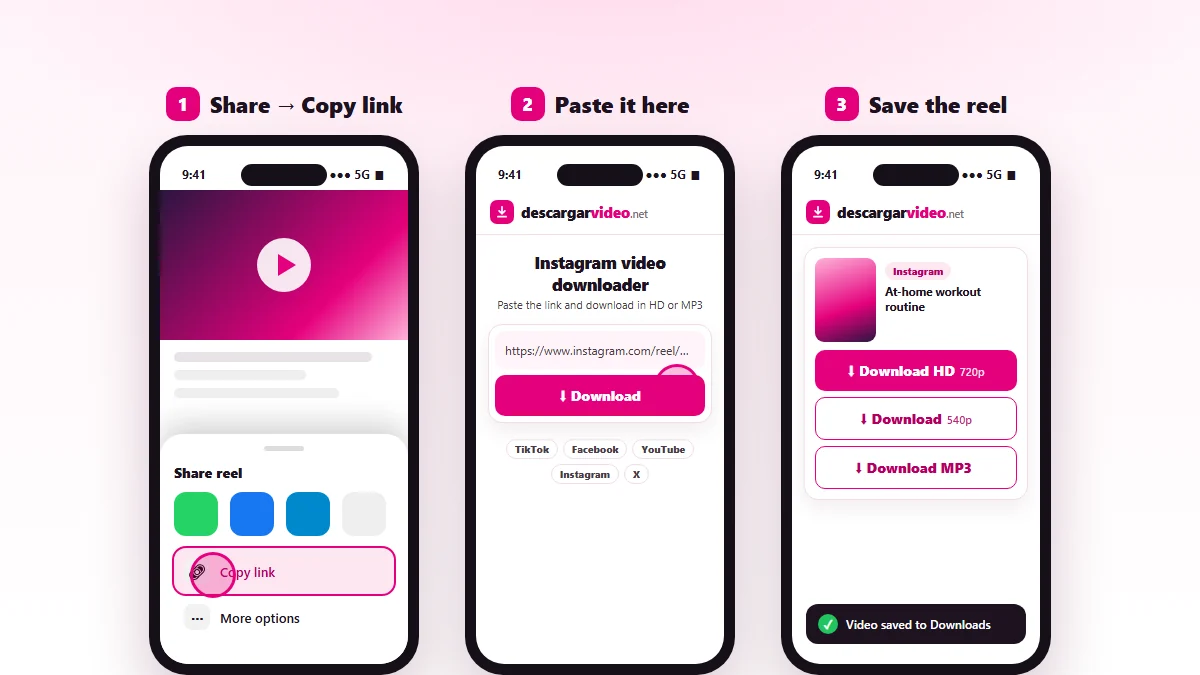
How to download Instagram videos: tap share, copy the Reel link, paste it into DescargarVideo and download in HD
Copy the Reel link, paste it and save it in HD.

How to download Instagram videos on Android

  1. Open Instagram and find the Reel or video post.
  2. Tap the share icon (paper plane), then Copy link.
  3. Open en.descargarvideo.net/instagram-video-downloader/ in Chrome, tap Paste, then Download.
  4. Choose Download HD. The video shows up in your gallery.

How to download Instagram videos on iPhone

  1. In Instagram tap share → Copy link.
  2. Open this page in Safari and paste the link.
  3. Tap Download and confirm.
  4. In Files → Downloads, tap the video and use Share → Save Video to keep it in Photos.

Download Instagram videos on a computer

On instagram.com, open the post or Reel on its own page and copy the address from the browser. Paste it into the downloader and click Download HD. The video is saved to your Downloads folder as an MP4.

What you can download from Instagram

Content Can you download it?
Reels from public accounts Yes, in HD
Video posts from public accounts Yes
Audio from a Reel Yes, as MP3
Private accounts No
Stories No

Tips for downloading Reels

  • Copy the link from the share button rather than the app’s address bar, so it is always complete.
  • If a post is a carousel with several videos, we download the main video.
  • For long Reels, use Wi-Fi.
  • If you only want the song from a Reel, tap Download MP3.

If an Instagram video will not download

  • The account is private, so it cannot be downloaded.
  • The creator deleted or archived the Reel.
  • Instagram is limiting requests. Wait a minute and try again.

Respect creators

Reels belong to the people who make them. Download them for your own viewing and credit the creator if you share one. If you are a rights holder, see our DMCA policy.

Last updated: November 13, 2026

Common questions

Frequently asked questions

How do I download Instagram videos?
Open the Reel or post, tap share → Copy link, paste the link on this page and tap Download HD. The video is saved to your device.
How do I download Instagram Reels?
The same as any video: copy the Reel link with the share button, paste it here and download it in HD.
Do I need to log in to Instagram?
No. DescargarVideo never asks for your account. It only works with public posts that anyone can see without following the account.
Can I download videos from private accounts?
No. To protect people's privacy, we only download content from public accounts.
Can I download Instagram Stories?
Not at the moment. Stories are temporary and visible only to followers, so we do not download them.
Can I download Instagram photos?
This tool is built for videos and Reels. For photos, ask the creator or save them to a collection inside the app.
Where are Instagram videos saved?
On Android, in Downloads and your gallery. On iPhone, in Files → Downloads; use Share → Save Video to move them to Photos.
How do I download the audio from a Reel?
Paste the Reel link and tap Download MP3. You can also use our MP3 converter.