Download videos free in HD, MP4 and MP3
DescargarVideo is an online video downloader built to make saving a video as easy as copy and paste. It does not matter whether you found it on TikTok, Facebook, YouTube or Instagram: the box above recognizes the link, finds the original file and shows your download options in a few seconds.
Every video comes with up to three options:
- Download HD: the best available quality, usually 720p or 1080p.
- Download: a lighter version, handy when storage or mobile data is tight.
- Download MP3: audio only, perfect for music, interviews or anything you want to hear without the screen.
The file downloads straight to your device. No extra steps, no pop-up tabs and no request to install anything.
A video downloader for every platform
The box above works out where each link comes from, so one tool covers every network. If you want instructions and options made for one site in particular, open its page.
TikTok video downloader
Paste the link of any public TikTok and save it in HD to your camera roll, even videos that have no Save video button. You can also grab just the song as an MP3. Everything is explained on our TikTok video downloader page.
Download TikTok without watermark
When you save a clip inside the app, TikTok stamps its logo and the creator’s name on it. Downloading through the link gives you the original version without the bouncing watermark. See how in TikTok without watermark.
Facebook video downloader
Facebook has no download button, but here you only need the link. It works with videos from public pages and profiles, Reels, Facebook Watch and live streams that have ended, in HD or normal quality. The full walkthrough is in our Facebook video downloader.
YouTube video downloader
Save YouTube videos and Shorts as MP4 up to 1080p, or a light 360p version to share in a chat. Go to the YouTube video downloader to see every quality, or use the YouTube to MP4 converter when you want a video file that plays on any device.
YouTube to MP3 and YouTube music
Only want the song? The YouTube to MP3 converter turns any video into audio in seconds, and our YouTube music downloader guide shows how to build an offline library.
Instagram video downloader
Download Reels and post videos from public accounts in HD, without logging in and without ever giving us your password. Great for keeping recipes, workouts and tutorials. Details on the Instagram video downloader page.
Twitter (X) video downloader
Twitter is now called X, but videos download the same way: copy the post link, paste it here and save the video or GIF as MP4. Links from both x.com and twitter.com work. Read the Twitter video downloader guide.
Pinterest video downloader
Video Pins such as recipes, hairstyles and DIY projects can be saved in HD too. Paste the Pin link, including short pin.it links, and download it exactly as the creator uploaded it. See the Pinterest video downloader.
MP3 converter and MP3 downloader
Any video from a supported site can become an audio file. Use the MP3 converter to pull the sound out of a video, or open the MP3 downloader to save songs you love from their link.
Download videos without a watermark
Lots of people want videos without a watermark, either to keep them clean or to repost their own content on another network. DescargarVideo never adds a logo to your downloads: the video is saved exactly as its creator published it. For TikTok we also fetch the original version, without the mark the app adds when you save. If the creator put their own mark on the video, that is part of the picture and stays.
How to download videos on your phone
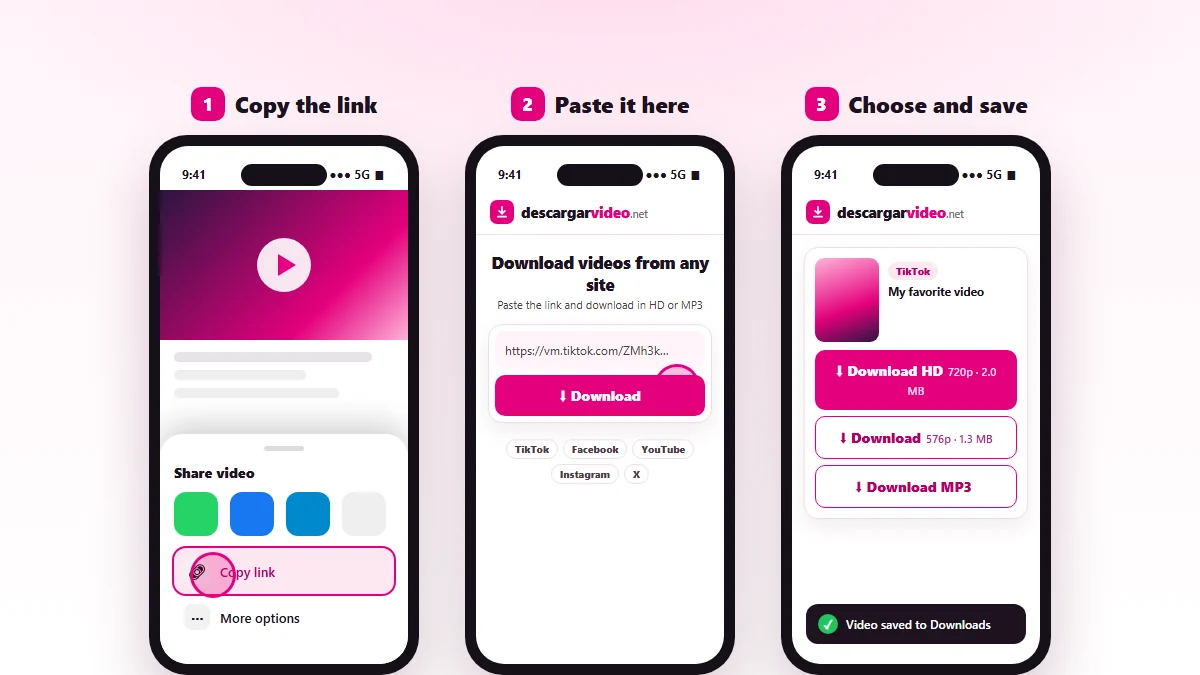
Most people download videos on their phone, so the site is designed for small screens first.
On Android
- Open the video in its app (TikTok, Facebook, YouTube…) and tap Share → Copy link.
- Go to en.descargarvideo.net in Chrome or your favorite browser.
- Tap Paste, then Download.
- Choose the quality. The video is saved to Downloads and appears in your gallery within seconds.
If it does not show up in the gallery, open the Files app (My Files on Samsung) and look in Downloads.
On iPhone and iPad
- Copy the video link in the app with Share → Copy link.
- Open Safari and go to en.descargarvideo.net.
- Paste the link and tap Download. When Safari asks whether you want to download the file, tap Download.
- Open Files → Downloads, tap the video and use Share → Save Video to move it to Photos.
It works on iPhone with iOS 13 or later. If Safari plays the video instead of downloading it, long-press the download button and choose Download Linked File.
How to download videos on a computer
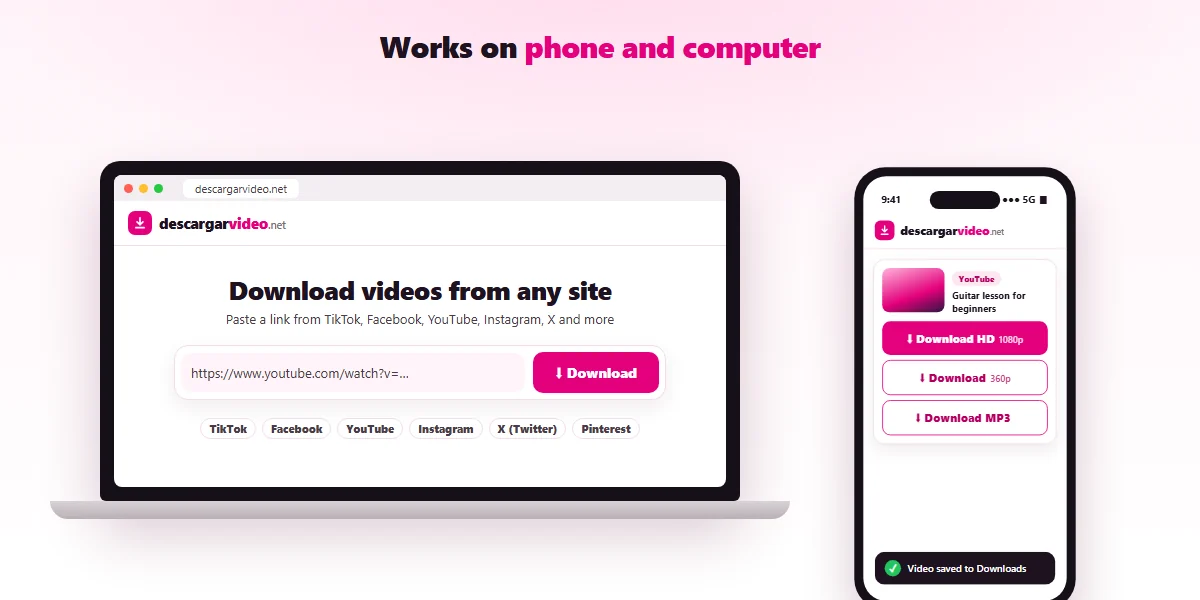
On Windows, Mac or Linux it is just as quick:
- Copy the video address from the browser bar, or right-click the video link and choose Copy link address.
- Paste it into the DescargarVideo box and press Enter.
- Click the quality you want. The file is saved in your Downloads folder.
MP4 files open in any player: the Windows Media Player, QuickTime on Mac or VLC. MP3 files work in any music app, and you can copy them to your phone or a USB drive.
Download videos without installing software
There are plenty of video downloader apps, but most ask for far more permissions than they need or only work with one network. Many people end up installing unknown programs that flood the device with ads or, worse, malware. With an online downloader there is no such risk: the work happens on our servers and you only receive the final video file.
You also never have to update anything. When a platform changes the way it serves videos, we adjust the service and you keep using the same site.
Formats and qualities
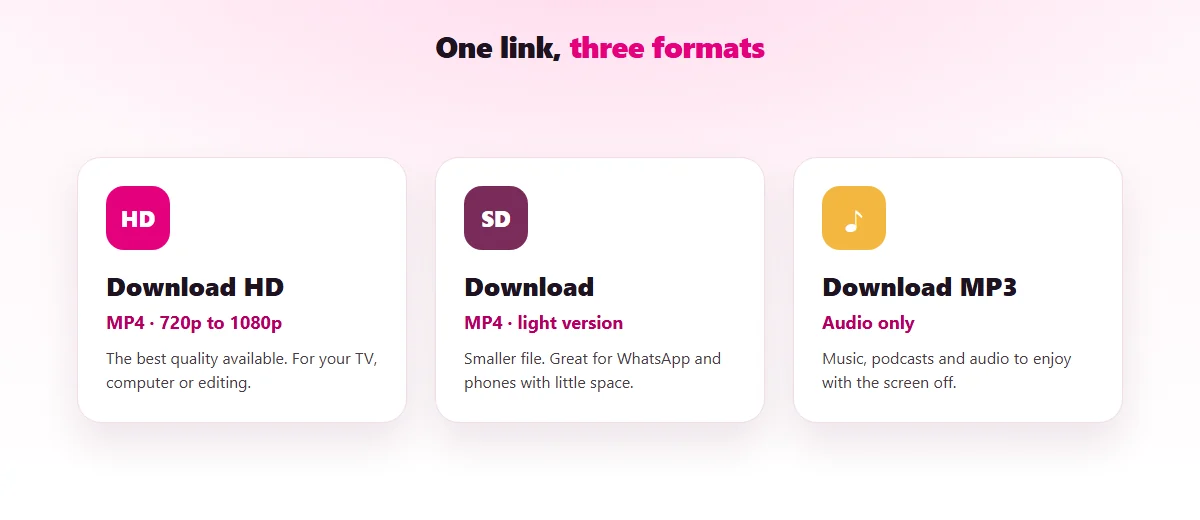
| Option | Format | Best for |
|---|---|---|
| Download HD | MP4 (720p–1080p) | Watching on a TV or computer, editing |
| Download | MP4 (360p–540p) | Saving space and data, sending in a chat |
| Download MP3 | MP3 | Music, podcasts and audio without video |
Final quality depends on how the video was uploaded. If someone posted a video in 480p, it cannot be turned into 1080p: we always give you the highest version that exists.
Which videos can you download?
Any public video, meaning one that anybody can watch without logging in. That covers regular videos, Reels, Shorts, clips and most posts with video on the supported networks. See the full list of supported sites.
What does not work, by design: videos from private accounts or closed groups, paid content, and live streams while they are still on air.
If a video will not download
Before trying again, check these points:
- The link is complete. It should start with
https://and have no extra text before or after it. - The video is still online. If the creator deleted it or made it private, it can no longer be downloaded.
- Wait a minute. Platforms sometimes limit requests for a short time.
- Try another browser. Very strict ad blockers can stop the download.
If none of that helps, our FAQ has more step-by-step fixes, or you can reach us through the contact page.
Download responsibly
Videos belong to the people who make them. Use DescargarVideo to save your own content, make backups or watch offline, and ask the creator before reposting their work. If you are a rights holder and want a video blocked from our downloader, see our DMCA policy.
Last updated: November 13, 2026