Online MP3 Converter

Convert any video to MP3 just by pasting its link: YouTube, TikTok, Facebook, Instagram, X and more. Download the audio in seconds, free.

Free · No sign-up · No app to install · Works on Android, iPhone and PC

Checking the video, one moment…
Step by step

How to convert a video to MP3

  1. 1

    Copy the video link

    In the app or browser, copy the link of the video you want the audio from: YouTube, TikTok, Facebook, Instagram or X.

  2. 2

    Paste it into the converter

    Paste the link in the box above and tap Download. We detect the platform automatically.

  3. 3

    Download the MP3

    Tap Download MP3. The audio is pulled out of the video and saved to your device as an MP3 file.

Features

One MP3 converter for all your apps

  • Many platforms, one box

    Convert videos from YouTube, TikTok, Facebook, Instagram, X, Pinterest, SoundCloud and more to MP3.

  • Audio only

    We separate the sound from the video, so the file is far smaller and plays in any player.

  • No uploads

    No need to download the video first or upload anything: the link is enough to convert it to MP3.

  • Universal MP3

    MP3 plays on phones, computers, speakers, car stereos and USB drives.

  • Fast, no limits

    Convert short or long audio, one after another, with no timers or artificial waits.

  • Free and private

    No sign-up, no email and no apps. The converter runs right in your browser.

Convert video to MP3 from any social network

A good MP3 converter saves you steps: instead of downloading a heavy video and then working out how to get the audio out, you paste the link and receive the MP3 directly. That is what DescargarVideo does with public videos from YouTube, TikTok, Facebook, Instagram, X and other platforms.

It is handy for keeping a song you heard in a TikTok, the audio of a Facebook interview, a YouTube lecture or a podcast posted on X. One tool for all of them, with nothing to install.
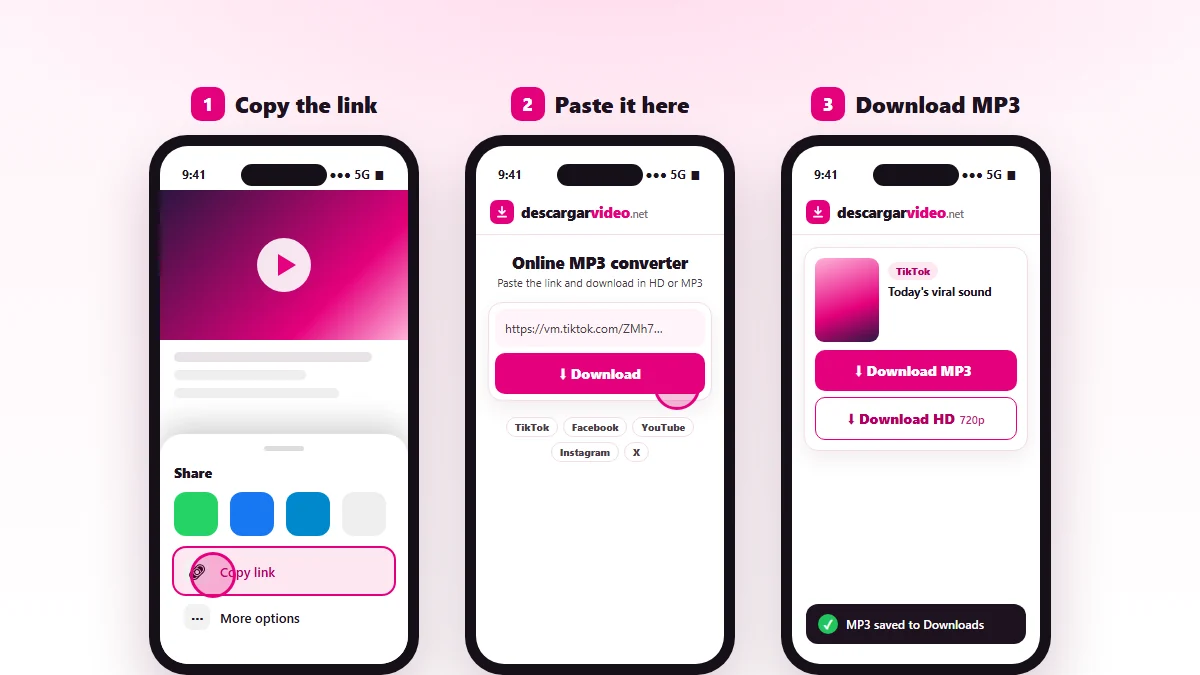
Online MP3 converter: paste a TikTok, YouTube or Facebook video link and download the audio as MP3
The same converter works for TikTok, YouTube, Facebook, Instagram and X.

How to convert video to MP3 on your phone

  1. Open the video in its app and tap Share → Copy link.
  2. Go to en.descargarvideo.net/mp3-converter/ in your browser.
  3. Tap Paste, then Download.
  4. Choose Download MP3.

On Android the audio is saved to Downloads and opens in your music player. On iPhone you will find it in Files → Downloads.

MP3 converter by platform

YouTube to MP3

The most common use: songs, mixes, podcasts and lectures. If YouTube is all you use, our dedicated YouTube to MP3 page has tips for getting the best audio.

TikTok to MP3

Great for keeping a trending song or a viral sound. Copy the TikTok link, paste it here and download the MP3 without saving the video.

Facebook to MP3

Convert ended live streams, interviews, sermons or music videos posted on public Facebook pages and profiles to MP3.

Instagram and X to MP3

Instagram Reels and X videos can be converted to MP3 too, as long as the account is public.

MP3 or MP4: which to choose

You want to… Format
Listen to music or a podcast without the screen MP3
Save space on your phone MP3
Use a sound as a ringtone MP3
See the picture MP4
Edit the video or post it on social media MP4

Tips for converting videos to MP3

  • Pick videos with good sound: official videos sound better than phone recordings.
  • For long audio, such as podcasts over an hour, use Wi-Fi.
  • Rename the file after downloading so you can find it in your library.
  • If a link does not work, check that the post is public and copy the link again.

Responsible use

The MP3 converter is for your own content, content you have permission for or content with a free license. Do not re-upload other people’s audio or use it commercially without permission. If you are a rights holder, see our DMCA policy.

Last updated: November 13, 2026

Common questions

Frequently asked questions

What is an online MP3 converter?
It is a tool that takes a video link and gives you only its audio as an MP3 file, without installing any software.
Which videos can I convert to MP3?
Public videos from YouTube, TikTok, Facebook, Instagram, X (Twitter), Pinterest, SoundCloud, Dailymotion and the other supported platforms. See the list of supported sites.
Can I convert a video that is saved on my phone?
This converter works with links to videos published online. For files already on your device you need a local editor or file converter.
How do I convert a TikTok to MP3?
Copy the TikTok link with the Share button, paste it here and tap Download MP3. That saves the song or sound from the video.
How do I turn a Facebook video into MP3?
Copy the link of the public Facebook video, paste it into the converter and choose Download MP3.
Is the MP3 good quality?
We use the best audio track the platform offers. If the original video has poor sound, the MP3 will too.
How big is an MP3?
Roughly 1 MB per minute of audio. A 4 minute song is about 4 MB.
Is the MP3 converter free?
Yes, completely free with no limit on conversions.