YTMP3 online: YouTube to MP3 without the hassle
Lots of people type “ytmp3” or “yt mp3” when they want to turn a YouTube video into MP3 quickly. The trouble is that many converters with that name are full of misleading ads, open a new tab on every click or insist that you install an app. This YTMP3 converter does the same job cleanly: paste the link and download the audio.
No account, no APK and no browser extension. Everything happens on the page, from your phone or computer.
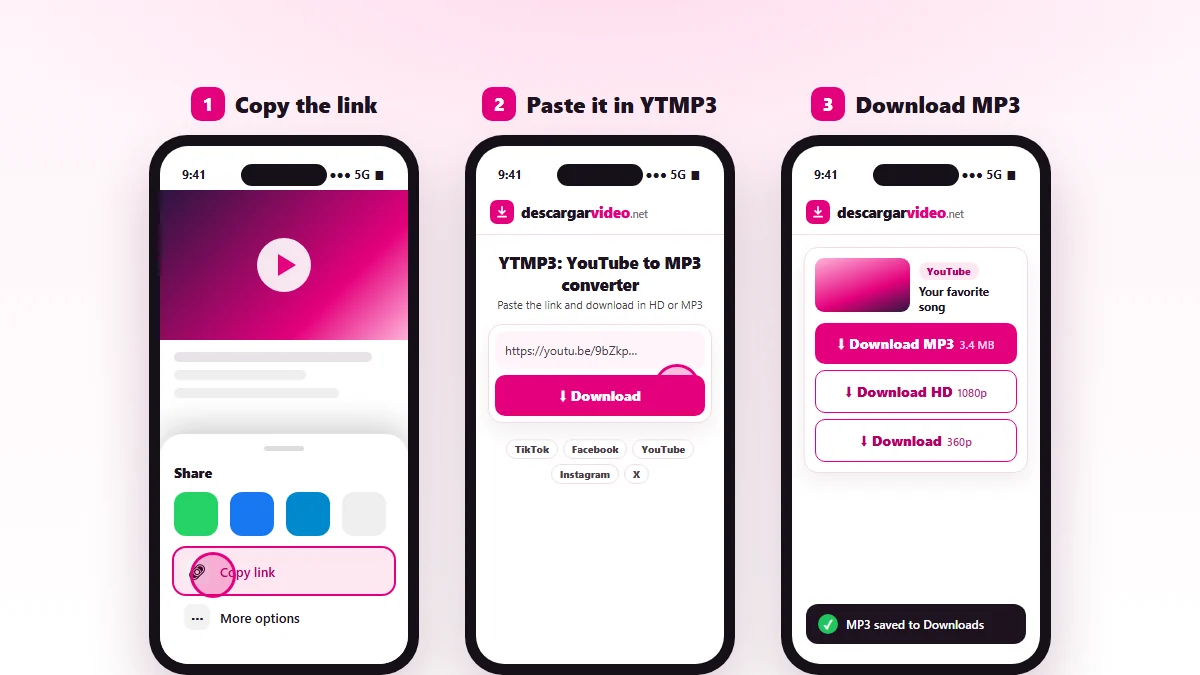
How to use YTMP3 on your phone
- Open YouTube and tap Share → Copy link on the video.
- Go to en.descargarvideo.net/youtube-video-downloader/ytmp3/ in Chrome or Safari.
- Tap Paste, then Download.
- Choose Download MP3. On Android it goes to Downloads; on iPhone, to Files → Downloads.
How to use YTMP3 on a computer
Copy the video address from the browser bar, paste it into the converter and click Download MP3. The file lands in your Downloads folder, ready for your music player or a USB drive.
How to spot a safe YTMP3 converter
| Sign | Safe converter | Risky converter |
|---|---|---|
| Installation | Asks you to install nothing | Wants an APK, program or extension |
| Ads | Light or none | Pop-ups and new tabs |
| Buttons | One clear download button | Several fake “Download” buttons |
| Permissions | None | Asks for notifications or access to your data |
| Connection | HTTPS (padlock) | No padlock or odd redirects |
If a YTMP3 site asks you to enable notifications or install something to “continue”, close it. None of that is needed to convert a video.
YTMP3 APK: why you do not need it
There are “YTMP3 APK” files online that promise to convert YouTube to MP3 from an app. They are not official, they are not on Google Play and they can bring aggressive ads or malware with them. An online converter like this one does the same thing in the browser, with no permissions and no space used on your phone.
YT MP3 or YT MP4
| You need | Format |
|---|---|
| A song to play offline | MP3 |
| A podcast or lecture as audio | MP3 |
| The whole video for a TV or computer | MP4 up to 1080p |
| A small video to send in a chat | Light MP4 (360p) |
For more audio tips see YouTube to MP3, and for high-quality video use YouTube to MP4.
Responsible use
Only convert your own content, content you have permission for or content with a free license, and keep it for personal listening. Do not re-upload other people’s music. YTMP3 is a generic search term; DescargarVideo is not affiliated with YouTube or with other sites that use that name. If you are a rights holder, see our DMCA policy.
Last updated: November 13, 2026