Download TikTok videos in seconds
TikTok is where people go for recipes, dances, tutorials, jokes and the songs everyone is humming. The trouble is that the app’s Save video button is not always there, and when it is, the video comes out with TikTok’s watermark on it. With DescargarVideo you can download TikTok videos in HD just by pasting the link.
The TikTok downloader recognizes full tiktok.com links as well as the short links the app copies, such as vm.tiktok.com and vt.tiktok.com. No login, nothing to install.
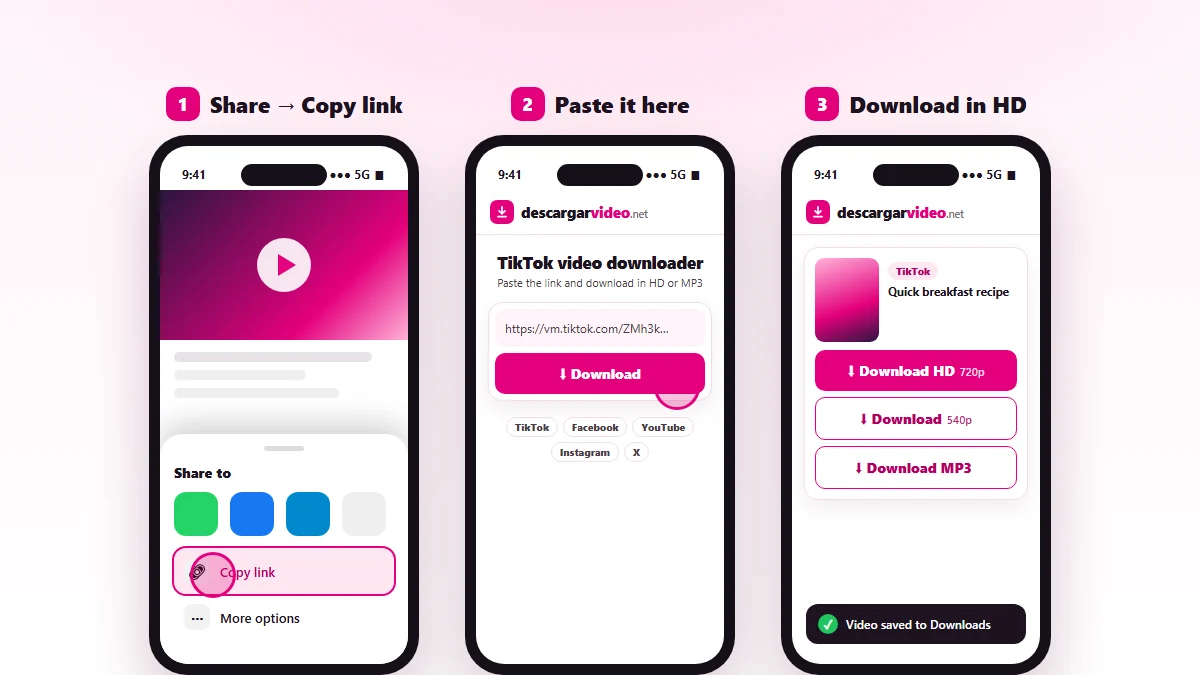
How to download TikTok videos on your phone
Android
- Open TikTok and find the video.
- Tap the Share arrow and choose Copy link.
- Open en.descargarvideo.net/tiktok-video-downloader/ in Chrome, tap Paste and then Download.
- Tap Download HD. The video lands in your gallery within a few seconds.
iPhone
- In TikTok tap Share → Copy link.
- Open this page in Safari, paste the link and tap Download.
- Choose Download HD and confirm.
- In Files → Downloads tap the video, then Share → Save Video to keep it in Photos.
Download TikTok on a computer
On a computer, open the video on tiktok.com, copy the address from the browser bar and paste it into the downloader. The video is saved to your Downloads folder as an MP4 you can edit, watch offline or copy to a USB drive. This works in Chrome, Edge, Firefox and Safari, on Windows and Mac.
What you can download from TikTok
| Option | Format | Best for |
|---|---|---|
| Download HD | MP4, best quality | Saving to your camera roll, editing, big screens |
| Download | Light MP4 | Sending in a chat, saving space |
| Download MP3 | Audio only | Viral songs, sounds, ringtones |
If you only want the sound of a video, our MP3 converter does the same job for any platform.
Save TikToks without losing quality
The quality of the download depends on the quality of the upload. TikTok compresses every video, so:
- Always pick Download HD if you will watch on a big screen or edit the clip.
- Do not download again a video you already saved with the app, because that copy carries the watermark.
- Use Wi-Fi if you are saving a lot of TikToks in a row.
Why a TikTok will not download
- The account is private or the video was deleted.
- The link is incomplete. Copy it again with the Share button.
- It is a LIVE broadcast. Live streams cannot be downloaded.
- TikTok is rate-limiting requests. Wait a minute and try again.
Respect creators
TikToks belong to the people who make them. Download your own videos or those of creators who gave you permission, and give credit if you share anything. Never upload someone else’s video as your own. If you are a creator and want your content blocked from downloads, see our DMCA policy.
Last updated: November 13, 2026