Likee Video Downloader

Paste the link of a public Likee video and save it in HD, or just the audio as MP3. Works with full links and short l.likee.video links.

Free · No sign-up · No app to install · Works on Android, iPhone and PC

Checking the video, one moment…
Step by step

How to download a Likee video

  1. 1

    Copy the video link

    On the Likee video tap Share and choose Copy link. You get a short link like l.likee.video/v/…

  2. 2

    Paste it into the downloader

    Paste the link in the box above and tap Download. We follow the short link to the original video.

  3. 3

    Save the video

    Tap Download HD to save the video as MP4 or Download MP3 if you only want the music.

Features

Likee in your gallery, no hassle

  • HD quality

    Download Likee videos in the best available quality, usually 720p or higher.

  • Short links

    l.likee.video links copied from the app work as they are.

  • Music as MP3

    Save the song or sound effect from a video as an MP3 file.

  • No Likee account

    You do not need to log in or follow the creator to download public videos.

  • Phone and PC

    Works on Android, iPhone, Windows and Mac in the browser.

  • Free

    No sign-up and no limit on videos.

Download Likee videos in HD

Likee is a short-video network full of special effects, filters, challenges and music. If you saw a video you want to keep, with DescargarVideo all you need is its link: paste it here and download it in HD or as MP3, with nothing to install.

This Likee video downloader accepts full likee.video links and the short l.likee.video links the app copies.
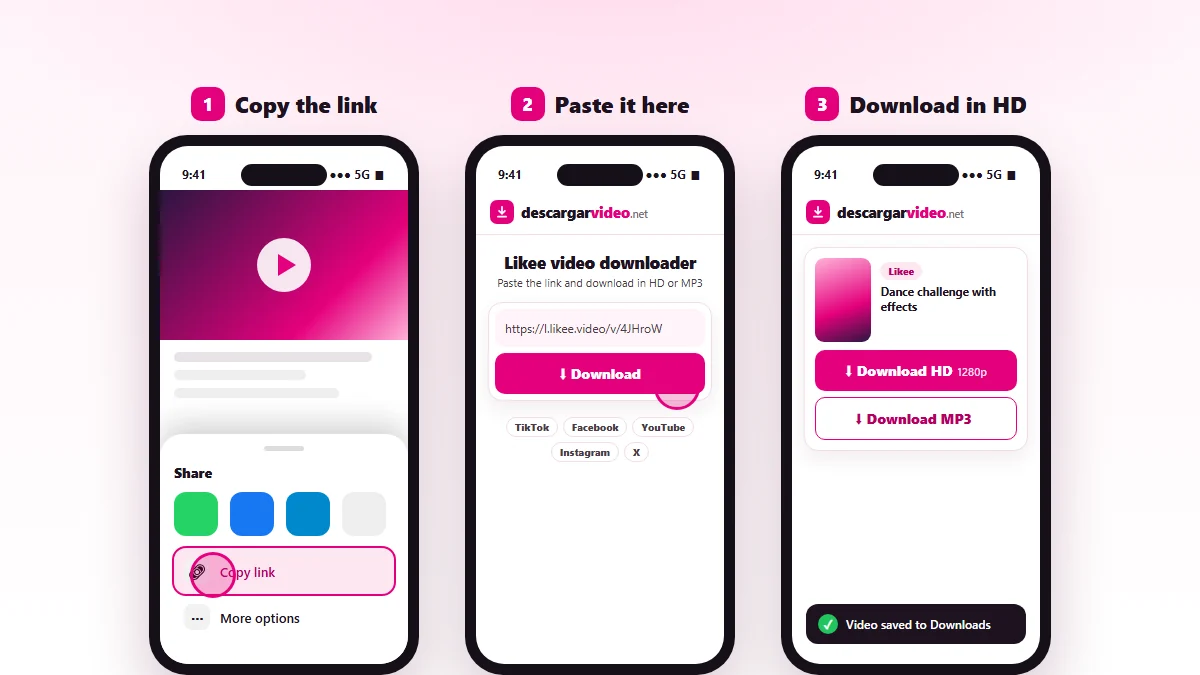
How to download Likee videos: copy the short link, paste it into DescargarVideo and download in HD
Copy the Likee video link, paste it and download it in HD.

How to download Likee videos on your phone

  1. Open Likee and find the video.
  2. Tap Share and choose Copy link.
  3. Open en.descargarvideo.net/likee-video-downloader/ in your browser and paste the link.
  4. Tap Download, then Download HD.

On Android the video appears in your gallery. On iPhone you will find it in Files → Downloads, and Share → Save Video moves it to Photos.

How to download Likee videos on a computer

On likee.video, open the video and copy the address from the browser. Paste it into the downloader and click Download HD. The MP4 lands in your Downloads folder.

What you can download from Likee

Content Can you download it?
Public videos Yes, HD MP4
Music from a video Yes, as MP3
Live streams No
Private videos No

If a Likee video will not download

  • The link is not a video. Copy it from the video’s Share button, not from the profile.
  • The video was deleted or is private.
  • Likee is not available in some regions; if the link does not open in your browser either, we cannot download it.

If the video is also on TikTok, you can grab it with our TikTok video downloader.

Respect creators

Likee videos belong to their creators. Download them for your own viewing and credit the creator if you share one with permission. If you are a rights holder, see our DMCA policy.

Last updated: November 13, 2026

Common questions

Frequently asked questions

How do I download a Likee video?
Copy the video link with the Share button, paste it on this page and tap Download HD. The video is saved to your device as MP4.
Do l.likee.video links work?
Yes. Short links shared by the app are followed automatically until we find the video.
Does the video download with a watermark?
When Likee offers a version without the watermark, that is the one you get. If only the watermarked version exists, we download the best available.
Can I download Likee videos on iPhone?
Yes. Open the page in Safari, paste the link and download. The video lands in Files → Downloads.
Can I download private Likee videos?
No. Only public videos that anyone can watch will work.
How do I save just the song from a Likee video?
Paste the link and tap Download MP3. You get the video's audio as an MP3 file.