Download SoundCloud songs and mixes as MP3
SoundCloud is home to thousands of independent artists, producers and DJs. You will find remixes, live sets, podcasts and songs that are often not on other platforms. With DescargarVideo you can turn SoundCloud into MP3 by pasting the track link.
The music is saved on your device as a normal file, so you can listen offline and without ads.
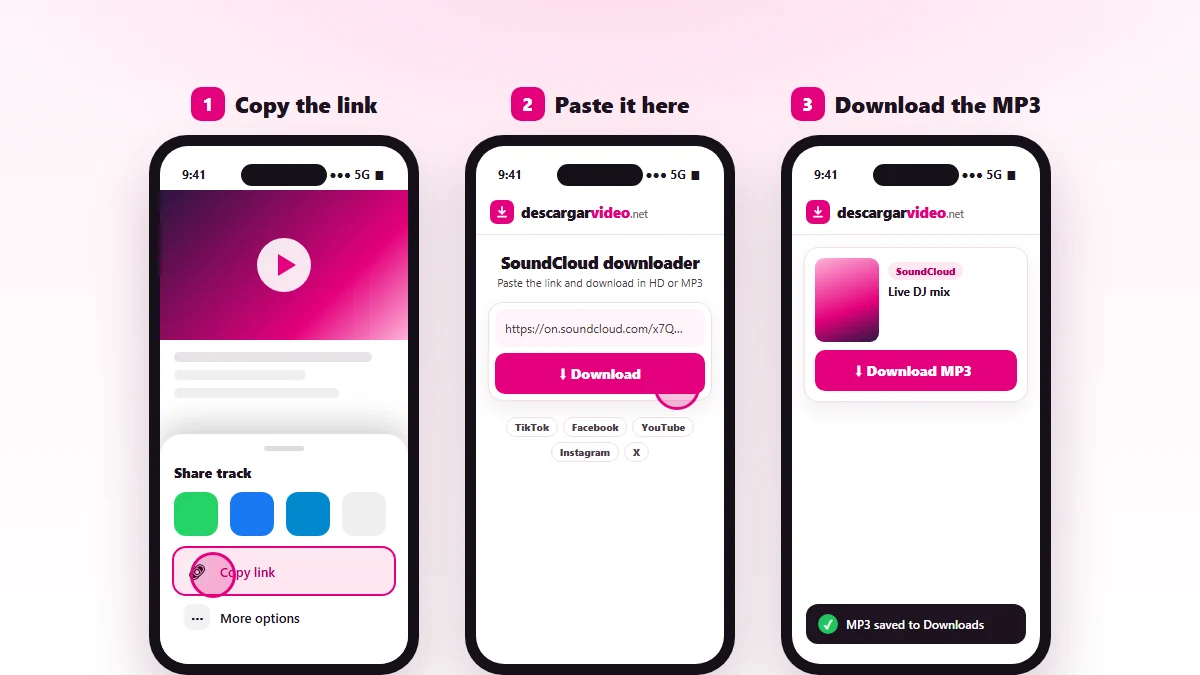
How to download from SoundCloud on your phone
- Open the song in the SoundCloud app.
- Tap Share → Copy link.
- Open en.descargarvideo.net/soundcloud-downloader/ in your browser, paste the link and tap Download.
- Tap Download MP3. On Android it lands in Downloads; on iPhone, in Files → Downloads.
How to download from SoundCloud on a computer
On soundcloud.com, open the track, copy the address from the browser and paste it into the downloader. Click Download MP3 and the file lands in your Downloads folder. From there you can move it to your phone or a USB drive.
Tips for your SoundCloud downloads
- For mixes over an hour, use Wi-Fi: the file can be bigger than 60 MB.
- Rename tracks as “Artist - Song” so they are easy to find.
- Follow and support the artists you download: many of them live off their fans.
For music from other platforms, try our MP3 converter, which also works with YouTube and TikTok.
If a track will not download
- The track is private or exclusive to SoundCloud Go+ subscribers.
- The link is for a profile or a playlist. Open the song and copy that link.
- The artist removed the track.
Support artists
SoundCloud music belongs to its creators. Only download tracks you have permission for or that have a free license, for your own listening. If you are a rights holder, see our DMCA policy.
Last updated: November 13, 2026