Download YouTube music and listen offline
YouTube has almost every song you can think of, but listening there has its downsides: you need a connection, the music stops if you lock the screen and ads pop up between tracks. If you want your YouTube music available all the time, the answer is to download the audio as MP3.
With DescargarVideo you can download music from YouTube by pasting the song’s link. No software, no account and no subscription: the audio goes straight to your device.
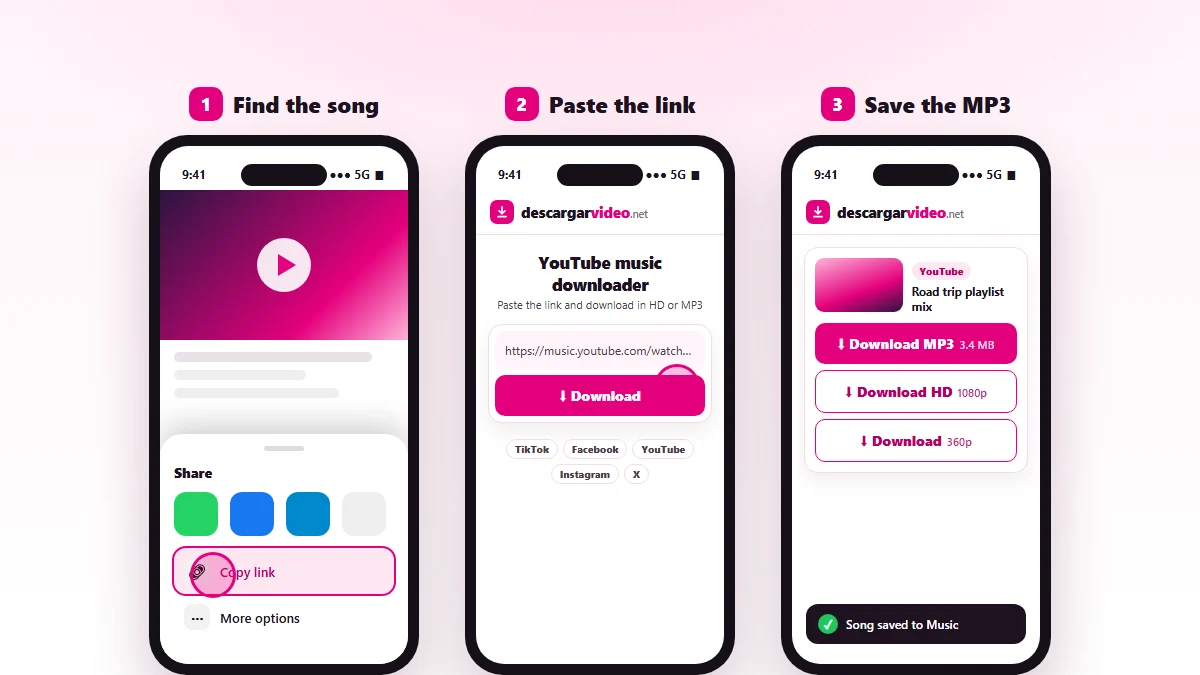
How to download YouTube audio on your phone
- Open the YouTube app and find the song.
- Tap Share → Copy link.
- Open this page in your browser and paste the link.
- Tap Download, then Download MP3.
On Android the song appears in Downloads and in your music app. On iPhone you will find it in Files → Downloads, where you can play or share it.
How to download YouTube music to a computer
On a computer it works the same way: copy the video address from the browser, paste it into the box and click Download MP3. Then sort your songs into folders, move them to your phone with a cable or copy them to a USB stick for the car.
Ideas for organizing your downloaded music
- Make folders by genre or mood: “gym”, “road trip”, “study”.
- Rename files as “Artist - Song” so you can find them fast.
- Keep a copy in the cloud or on your computer so you do not lose your collection when you change phones.
- For parties, put a playlist on a USB drive and plug it into the speaker or car stereo.
What YouTube music can you download?
The audio from any public video: official songs, concerts, DJ mixes, karaoke tracks, podcasts, interviews and audiobooks. If the video can be watched without logging in, it can be converted to MP3.
Private videos, age-restricted videos, members-only content and live streams that are still on air will not work.
Downloading YouTube music vs. YouTube Premium
| Download MP3 | YouTube Premium | |
|---|---|---|
| Price | Free | Monthly subscription |
| Offline | Yes, forever | Only while you pay |
| Your own file | Yes, a normal MP3 | No, only inside the app |
| Other devices | USB, speaker, car, PC | Only the YouTube app |
To pull songs from other sites such as TikTok or Facebook, use our MP3 converter. For one-off conversions see YouTube to MP3, or download YouTube videos as MP4.
Listen responsibly
Every song has artists and producers behind it. Download YouTube music for your own listening, support your favorite artists on official platforms and never re-upload someone else’s tracks. If you are a rights holder, see our DMCA policy.
Last updated: November 13, 2026