YouTube MP4: a video file that works everywhere
When you search “youtube to mp4” or “youtube mp4”, what you want is simple: the video as a normal file you can open offline, move to another device or edit. That is exactly what this YouTube to MP4 converter does.
Paste the link, pick a quality and you get an MP4 with picture and sound together. No software, no browser extensions and no account.
Why MP4 is the best format for saving videos
MP4 is the most compatible video format there is. Every phone plays it, as do most smart TVs, game consoles and every editing program. It also compresses well: a 1080p video keeps good quality without eating too much space.
So when you convert YouTube to MP4, you do not have to wonder whether it will open on your device. It just works.
Convert YouTube to MP4 on your phone
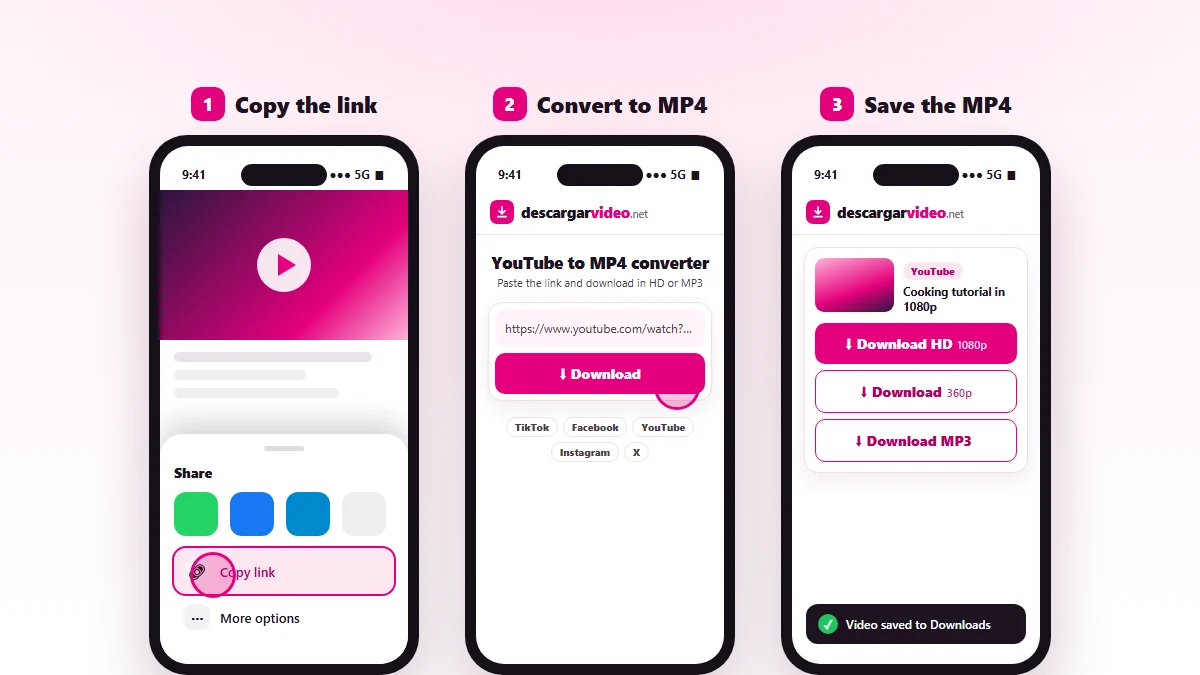
- In the YouTube app tap Share → Copy link.
- Open en.descargarvideo.net/youtube-video-downloader/youtube-to-mp4/ in your browser.
- Paste the link and tap Download.
- Choose Download HD. On Android the MP4 shows up in the gallery; on iPhone, in Files → Downloads.
Convert YouTube to MP4 on a computer
On Windows or Mac, copy the link from the address bar, paste it into the converter and click Download HD. The file lands in your Downloads folder and opens in Windows Media Player, QuickTime or VLC, or imports straight into your favorite editor.
Pick the right quality
| Option | Resolution | Best for |
|---|---|---|
| Download HD | 720p – 1080p | TV, computer, video editing |
| Download | 360p | Chats, phones with little space |
| Download MP3 | Audio only | Music and podcasts |
A 5 minute video in 1080p weighs around 100 MB; in 360p, about 15 MB. If you are saving lots of videos to your phone, the light version saves space.
Common uses for a YouTube to MP4 converter
- Watching tutorials and lectures offline, for example on a flight or commute.
- Saving clips to show in a presentation or a classroom.
- Editing your own clips, or clips you have permission for, in a project.
- Playing videos on a TV without internet using a USB drive.
- Backing up the videos from your own channel.
Common conversion problems
- The video is private, members-only or age-restricted: it cannot be converted because YouTube requires a login.
- HD conversion is slow: normal for long videos. Keep the page open.
- The platform is busy: wait a minute and try again.
For other download options, visit our YouTube video downloader.
Responsible use
Convert your own videos or videos you have permission to use, and never re-upload them as yours. If you are a creator and want your video blocked from downloads, see our DMCA policy.
Last updated: November 13, 2026