Download Twitch clips in HD
Twitch clips are how the best moments of a stream get saved: an incredible play, a reaction, a line that turns into a meme. The catch is that Twitch has no button to download them. With DescargarVideo you can download Twitch clips as MP4 up to 1080p by pasting the clip link.
It is the perfect tool for streamers who want to reuse their clips on TikTok, YouTube Shorts or Instagram Reels, and for fans who want to keep their favorite moments.
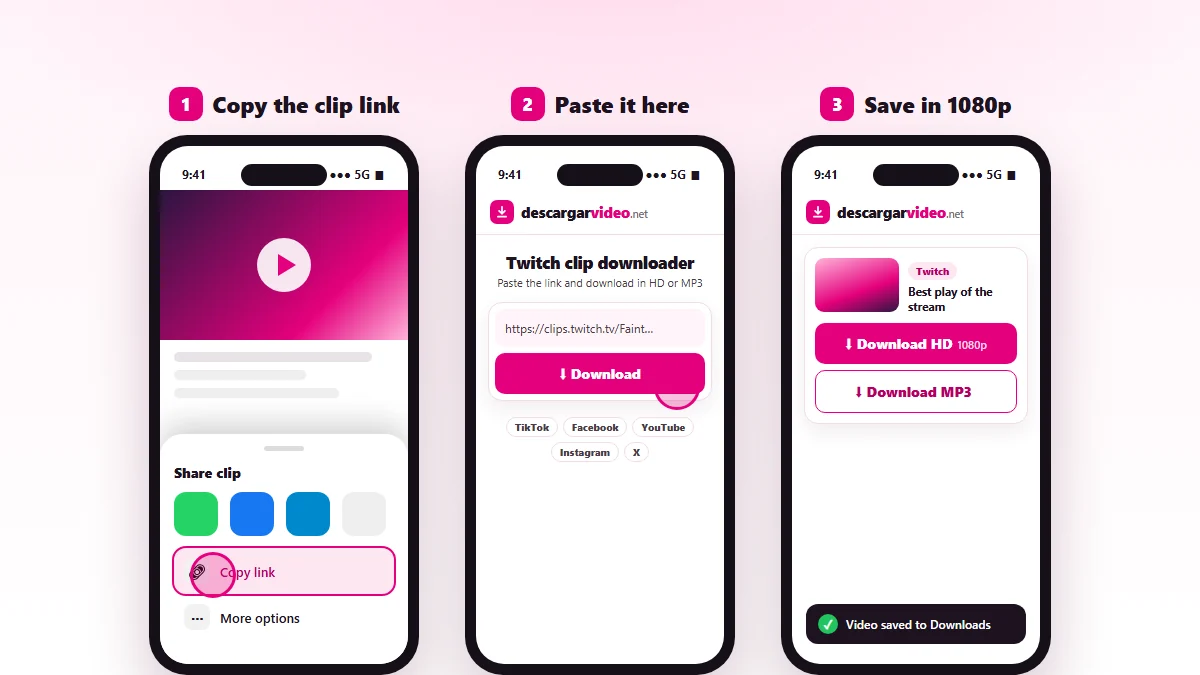
How to download Twitch clips on your phone
- Open the clip in the Twitch app.
- Tap Share and choose Copy link.
- Open en.descargarvideo.net/twitch-clip-downloader/ in your browser and paste the link.
- Tap Download, then Download HD.
How to download Twitch clips on a computer
On twitch.tv, open the clip (from the channel’s Clips tab) and copy the address from the browser. Paste it into the downloader and click Download HD. The MP4 lands in your Downloads folder, ready to edit.
Ideas for your clips
- Cut your best plays into vertical videos for TikTok and Shorts.
- Put together a weekly “best moments” video for YouTube.
- Back up the clips your community makes of your channel.
- Use the MP3 of an epic quote as a sound in your videos.
If a Twitch clip will not download
- The link is for a channel or a live stream, not a clip.
- The streamer deleted the clip.
- The channel has age or region restrictions.
Respect streamers
Clips are the streamers’ content. If you post a clip from another channel, ask permission and credit the creator. If you are a rights holder, see our DMCA policy.
Last updated: November 13, 2026