Pinterest Video Downloader

Paste the link of a video Pin and save it in HD to your gallery. Works with pinterest.com and short pin.it links, no login needed.

Free · No sign-up · No app to install · Works on Android, iPhone and PC

Checking the video, one moment…
Step by step

How to download a Pinterest video

  1. 1

    Copy the Pin link

    Open the video Pin, tap Share and choose Copy link. You will get a link like pin.it or pinterest.com.

  2. 2

    Paste it into the downloader

    Paste the link in the box above and tap Download. We follow short links to the original video.

  3. 3

    Save the video

    Tap Download HD and the Pin video is saved to your phone or computer as an MP4.

Features

Why download Pinterest videos here

  • HD videos

    We fetch the Pin's original video in the best quality Pinterest has available.

  • No watermark

    The video is saved exactly as the creator uploaded it, with no logos added by us.

  • Short pin.it links

    Links copied from the Pinterest app work as they are, without editing.

  • No Pinterest account

    You do not need to log in or follow the creator to download a public Pin.

  • Ideas saved for good

    Keep tutorials, recipes, hairstyles and DIY projects to watch offline, even if the Pin is removed.

  • Phone and PC

    Works on Android, iPhone, Windows and Mac in the browser.

Save Pinterest video ideas

Pinterest is the perfect place for ideas: step-by-step recipes, hairstyles, nails, home decor, crafts and workouts. Many of those ideas come as videos, and the last thing you want is to lose a Pin right when you need it. With DescargarVideo you can download Pinterest videos in HD and keep them on your phone, even offline.

Copy the Pin link, paste it here and download the video. No Pinterest account and no app needed.
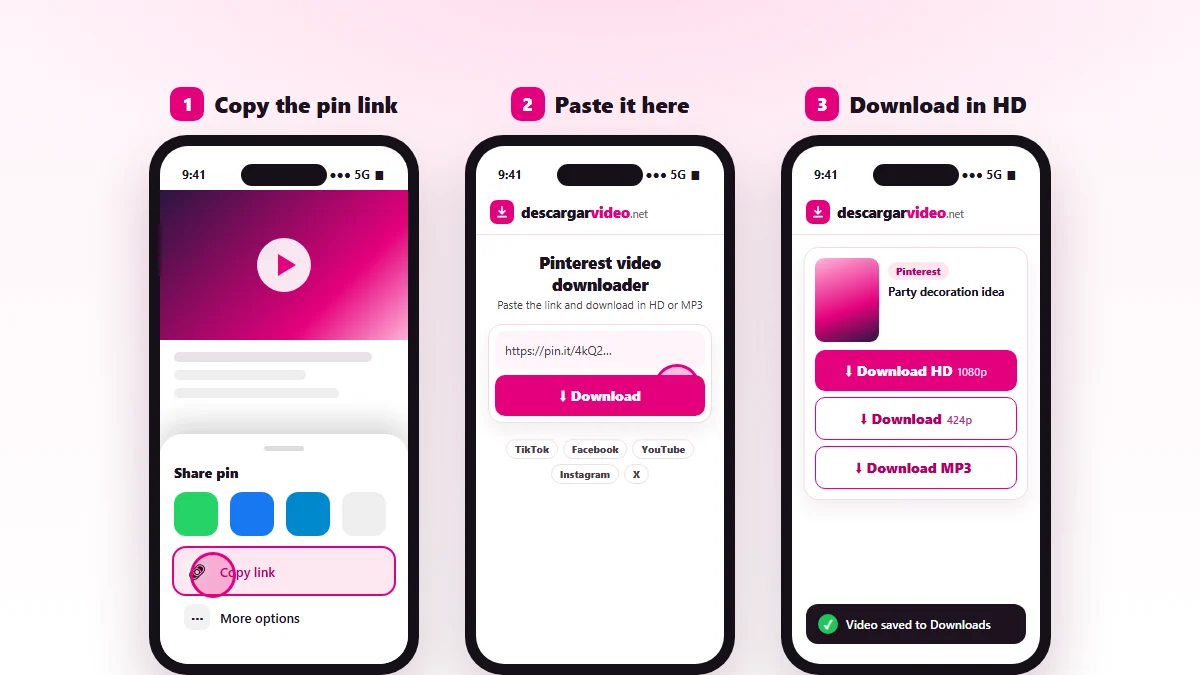
How to download Pinterest videos: copy the Pin link, paste it into DescargarVideo and download the video in HD
Copy the video Pin link, paste it and download in HD.

How to download Pinterest videos on your phone

  1. Open the Pinterest app and go to the video Pin.
  2. Tap Share (the arrow icon) and choose Copy link.
  3. Open en.descargarvideo.net/pinterest-video-downloader/ in your browser and paste the link.
  4. Tap Download, then Download HD.

On Android the video appears in your gallery. On iPhone, open it in Files → Downloads and use Share → Save Video to keep it in Photos.

How to download Pinterest videos on a computer

On pinterest.com, open the video Pin and copy the address from the browser bar. Paste it into the downloader and click Download HD. The video lands in your Downloads folder.

Which Pinterest videos can you download?

Pin type Can you download it?
Video Pin Yes, as MP4
Idea Pin with video Yes, the main video
Pins from public accounts Yes
Secret boards No
Image-only Pin No, save the image in the app

Ideas for using Pinterest videos

  • Build a recipe folder to follow in the kitchen without Wi-Fi.
  • Keep hair or makeup tutorials to practice at your own pace.
  • Collect decor ideas for a party or an event.
  • Have your favorite workouts on hand at the gym.

If a Pinterest video will not download

  • The Pin has no video, only an image or a still GIF.
  • The Pin is on a secret board or was deleted.
  • The link is for a whole board. Open the Pin and copy that Pin’s link.

If the Pinterest video originally came from TikTok, you can also find it there and download it with our TikTok video downloader.

Respect creators

Pinterest ideas have authors. Keep the videos for personal use and credit the creator when you share an idea. If you are a rights holder, see our DMCA policy.

Last updated: November 13, 2026

Common questions

Frequently asked questions

How do I download Pinterest videos?
Open the video Pin, tap Share → Copy link, paste the link on this page and tap Download HD. The video is saved as MP4.
How do I download Pinterest videos on my phone?
Copy the Pin link in the app, open this page in your browser, paste it and download. On Android it lands in your gallery; on iPhone, in Files → Downloads.
Do I need an app to download Pinterest videos?
No. Lots of people look for a Pinterest video downloader app, but DescargarVideo works entirely in the browser with nothing to install.
Are videos downloaded without a watermark?
Yes. We download the Pin's original video. If the video already carried a mark from its creator (for example from TikTok), that stays because it is part of the video.
Can I download Pinterest images?
This tool downloads video Pins. To save an image, long-press it in the app and choose Download image.
Do pin.it links work?
Yes. Short pin.it links are followed automatically until we find the Pin's video.
Is it free to download Pinterest videos?
Yes, completely free with no limit.