YouTube to MP3 in seconds: just paste the link
Often what you want from a YouTube video is not the picture but the sound: a song, a podcast, a lecture or an audiobook. This YouTube to MP3 converter lets you keep only the audio and listen anywhere, with no data and the screen off.
The process is the one millions of people use when they search “youtube to mp3” or “youtube mp3”: copy the video link, paste it here and download the file. The difference is that DescargarVideo has no fake buttons, no pop-ups and nothing to install.
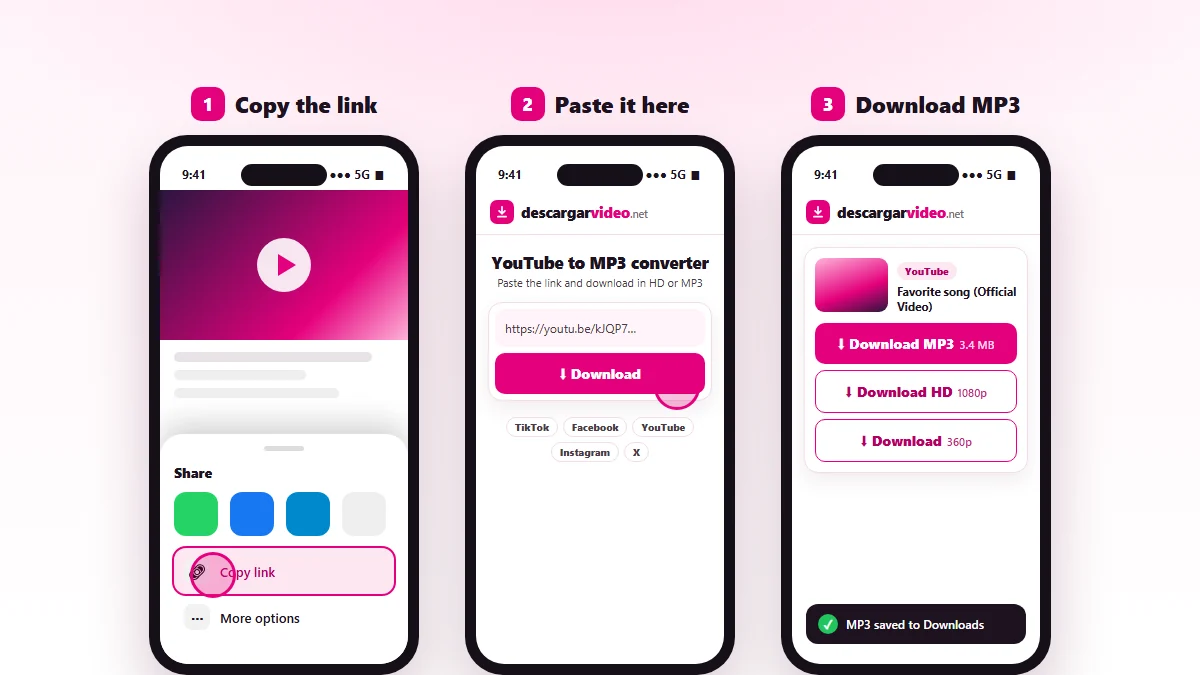
How to convert YouTube to MP3 on your phone
On Android
- Open YouTube, go to the video and tap Share → Copy link.
- Open en.descargarvideo.net/youtube-video-downloader/youtube-to-mp3/ in Chrome.
- Tap Paste, then Download.
- Choose Download MP3. The song lands in your Downloads folder and opens in your music player.
On iPhone
- Copy the video link from the YouTube app.
- Open this page in Safari, paste the link and tap Download.
- Tap Download MP3 and confirm.
- Open the Files app → Downloads to play or share the MP3.
Convert YouTube to MP3 on a computer
On Windows or Mac, copy the video address from the browser, paste it into the converter and click Download MP3. The file is saved to your Downloads folder. From there you can move it to your phone, to a USB stick for the car or into your music library.
Short youtu.be links, YouTube Music links and links with a start time all work: the converter recognizes them.
What converting YouTube to MP3 is good for
- Listening to music offline at work, on your commute or at the gym.
- Saving podcasts and interviews to listen to later.
- Reviewing lectures, talks or courses with just the audio.
- Taking a party playlist along on a USB drive.
- Using your own audio as a ringtone or notification sound.
YouTube MP3 or MP4: which one?
| Format | What you get | When to choose it |
|---|---|---|
| MP3 | Audio only | Songs, podcasts, lectures, audiobooks |
| MP4 HD | Full video up to 1080p | Watching on a TV or computer |
| Light MP4 | 360p video | Sending in a chat or saving space |
If you need the video, our YouTube video downloader has every MP4 quality, and the YouTube to MP4 converter explains the formats.
Tips for a better MP3
- Use the official video of the song. It usually has better audio than re-uploads.
- Avoid videos with someone talking over the music if you only want the song.
- If the audio sounds quiet, that is how the original was recorded; the converter does not change the volume.
- For very long mixes, use Wi-Fi: the file can be over 50 MB.
If the converter does not work with a video
- The video is private, members-only or age-restricted: YouTube requires a login, so it cannot be converted.
- It is a live stream: wait until it ends and is posted.
- You see “the platform is busy”: wait a minute and try again.
Use audio responsibly
Music and podcasts have owners. Convert YouTube to MP3 to listen to your own content or content you have permission for or that has a free license, and never re-upload it as yours. If you are a rights holder, see our DMCA policy.
Last updated: November 13, 2026