Download YouTube videos as MP4, free and in HD
YouTube is the most watched video platform on the planet, yet its app only lets you watch online unless you pay for YouTube Premium. With this YouTube video downloader you can save public videos as a normal MP4 file: it stays on your phone or computer, opens in any player and does not depend on an internet connection or on the video staying online.
Every time you paste a link you get three clear options:
- Download HD: the best quality up to 1080p. Great for a TV, a computer or editing.
- Download: a light 360p version that takes little space and is easy to share.
- Download MP3: only the audio, for music, podcasts or lectures.
How to download YouTube videos on your phone
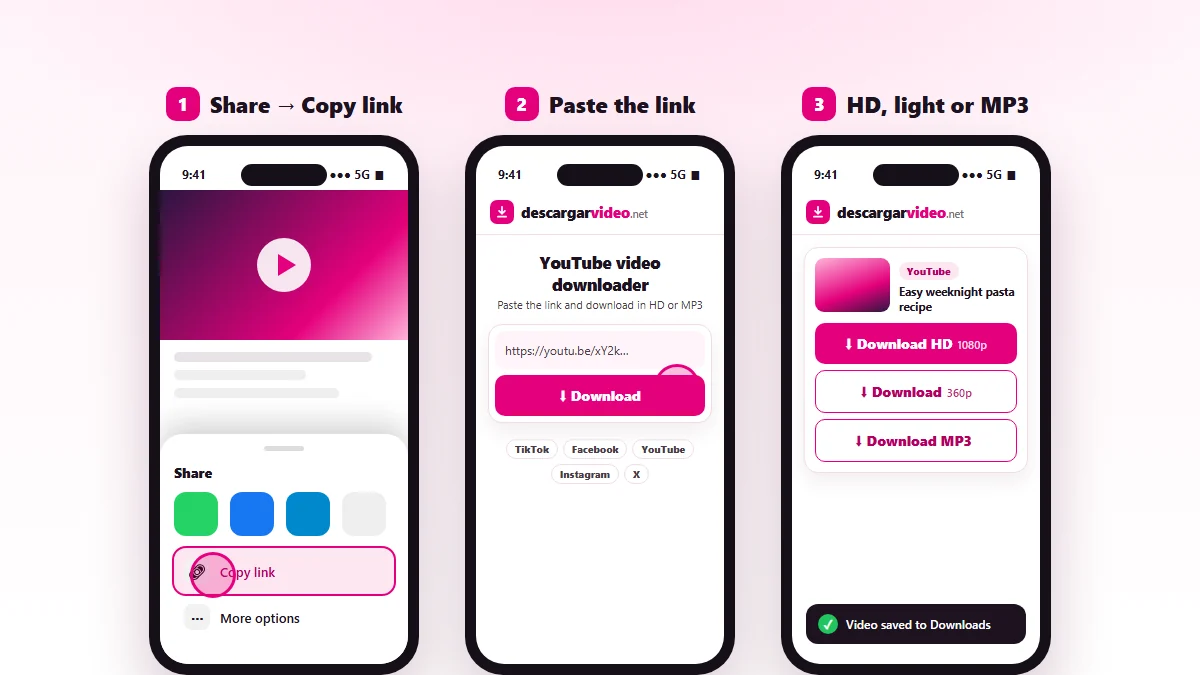
Android
- Open the video in the YouTube app and tap Share → Copy link.
- Go to en.descargarvideo.net/youtube-video-downloader/ in Chrome.
- Tap Paste, then Download.
- Choose Download HD. The video is saved to Downloads and shows up in your gallery.
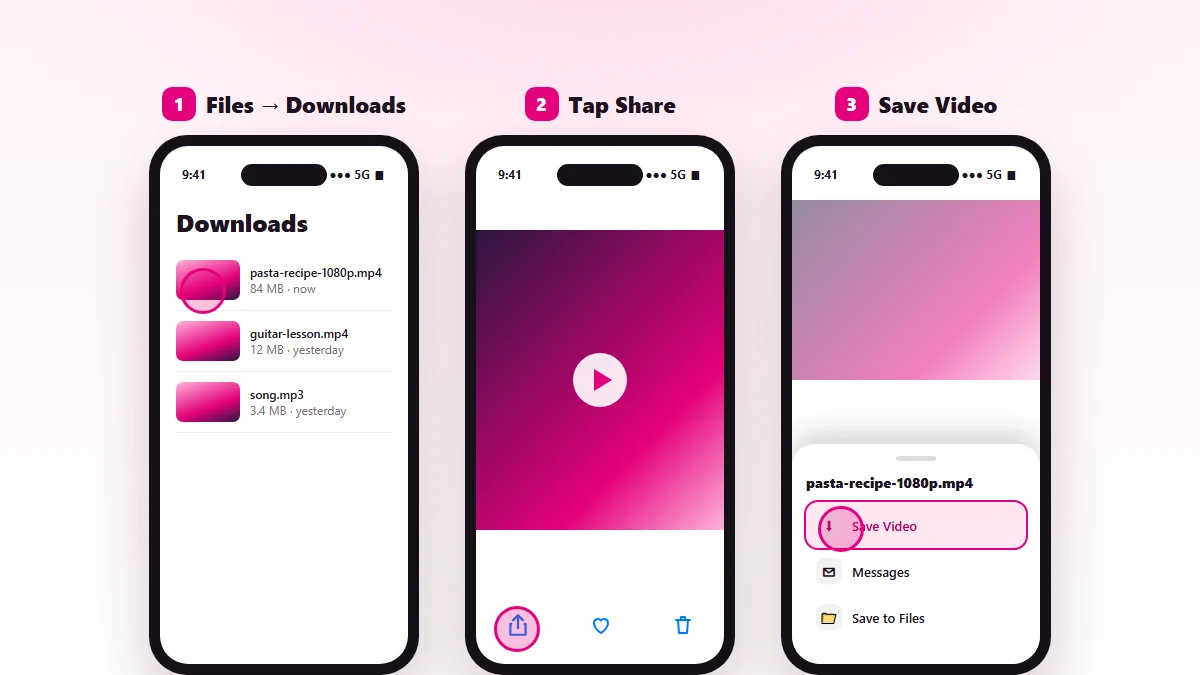
iPhone
- In the YouTube app tap Share → Copy link.
- Open this page in Safari, paste the link and tap Download.
- Choose the quality and confirm the download.
- Open Files → Downloads, tap the video and use Share → Save Video to see it in Photos.
How to download YouTube videos on a computer
On Windows or Mac, copy the video address from the browser bar. Short youtu.be links and links with a start time (&t=) work too. Paste it into the box, press Enter and click the quality you want. The MP4 lands in your Downloads folder and plays in Windows Media Player, QuickTime or VLC.
Tip: links copied from inside a playlist work as well. We download the video you were watching.
Download YouTube Shorts
Shorts are vertical videos under a minute or so, and they can be downloaded too. Open the Short, tap Share → Copy link and paste it here. You get a vertical MP4, ready to watch on your phone or share in your stories.
Which quality to choose
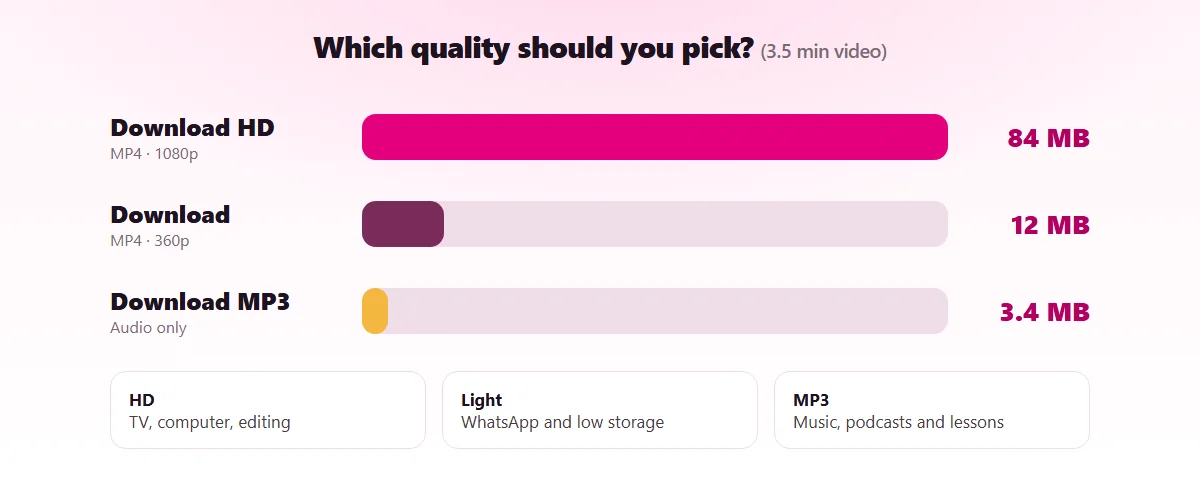
| Option | Resolution | Approx. size (5 min video) | Best for |
|---|---|---|---|
| Download HD | 720p – 1080p | 30 – 120 MB | TV, computer, editing |
| Download | 360p | 10 – 20 MB | Messaging apps, phones with little space |
| Download MP3 | Audio only | 4 – 6 MB | Music, podcasts, lectures |
The real size depends on length and content: a video with lots of motion weighs more than an interview with a still shot.
Save YouTube videos to send in a chat
Messaging apps limit how big a video can be, so a 1080p file sometimes will not send or arrives heavily compressed. To share a YouTube video in WhatsApp, Messenger or iMessage:
- Save the Download version (360p).
- Open the chat and attach the video from your gallery or Photos.
- Send it.
If the video is long, trim it in your phone’s gallery editor first so it is smaller.
Download YouTube music as MP3
Plenty of people want to download music from YouTube to listen without using data. Paste the song’s link, tap Download MP3 and the audio is ready in seconds. It works for songs, mixes, podcasts, audiobooks and recorded classes. Our dedicated YouTube to MP3 converter and YouTube music downloader guide go further. Music is copyrighted, so keep it for your own listening.
If a YouTube video will not download
- Private, members-only or age-restricted video: it cannot be downloaded because YouTube requires a login to watch it.
- Live stream: wait until it ends and is posted as a regular video.
- “The platform is busy”: YouTube limits requests at times. Wait a minute and try again.
- The HD download is slow to start: on long videos the server needs a few seconds to join picture and sound. Keep the page open.
Use the downloader responsibly
YouTube videos belong to their creators. Download your own content, Creative Commons videos or videos you have permission for, and never re-upload them as your own. If you are a creator and want your video blocked from our site, follow the steps in our DMCA policy.
Last updated: November 13, 2026